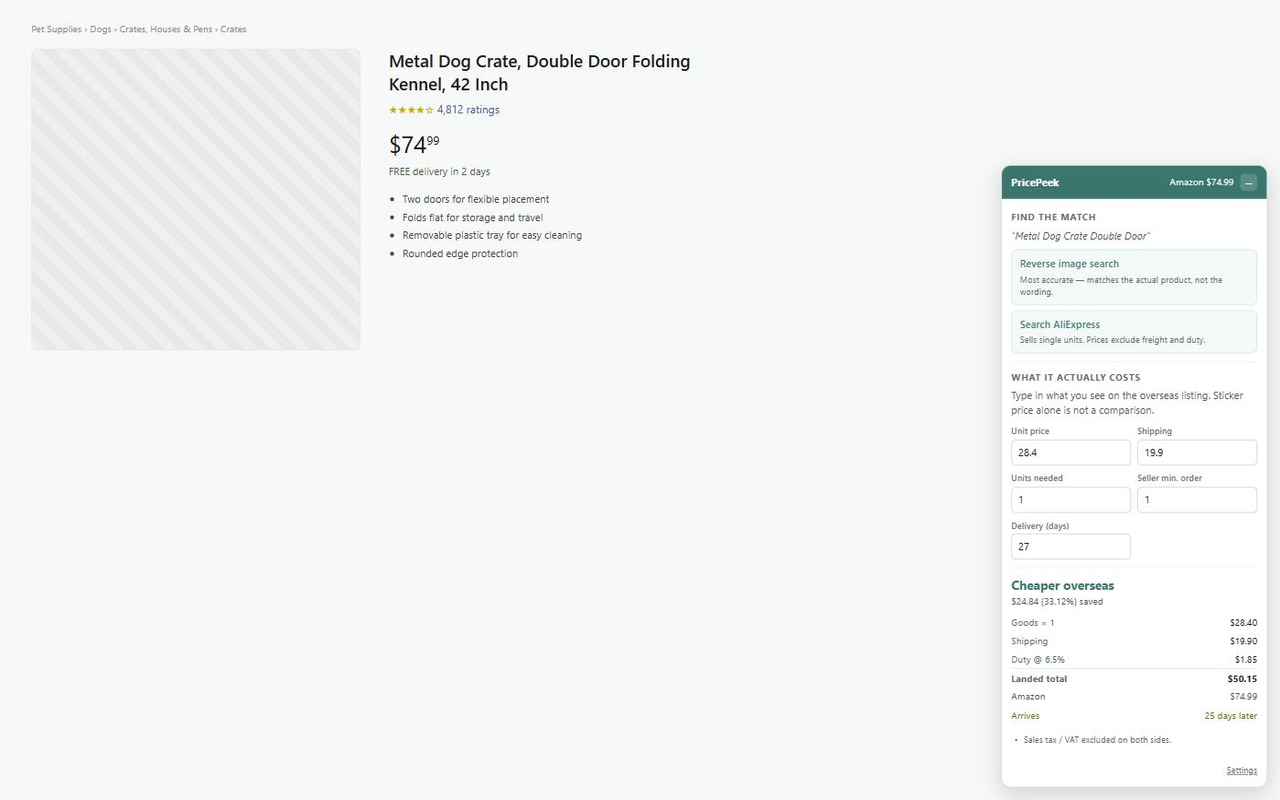
“It’s six bucks on AliExpress” ignores freight, import duty, the minimum order, and a five-week wait. PricePeek does the arithmetic that screenshot skipped.
PricePeek on an Amazon product page: the match links, the landed-cost breakdown, and what is still missing from it.
How it works
1
Install
One click from the Chrome Web Store or Firefox Add-ons. No account, no signup.
2
Find the same item
Open any Amazon product page. PricePeek offers a reverse-image search — the product photo is the only ID the two marketplaces share — and a cleaned-up text search with the marketing fluff stripped out.
3
Add the parts that were missing
Type in the unit price and shipping you actually see. PricePeek adds duty at your rate, normalises for pack size, and shows the delivery gap in days next to the money gap.
Features
Built around one rule: never state a saving the inputs do not support.
Landed cost
Freight and duty, or it doesn’t count
The comparison is unit price × quantity, plus shipping, plus import duty at the rate you set, plus any brokerage fee. Leave the duty rate blank and PricePeek adds nothing — and labels every comparison incomplete until you fill it in. It ships no guessed tariff percentage, because a guessed rate manufactures exactly the inflated saving this extension exists to debunk.
Pack size
A 12-pack is not one unit
PricePeek reads the pack size out of the Amazon title — “Pack of 12”, “36 Count”, “6 Set” — and pre-fills the quantity so you’re pricing the same number of things on both sides.
Minimum order
A price you can’t pay is not a price
Enter the seller’s minimum order quantity. If it’s above what you actually want, the verdict is flagged: that headline unit price is wholesale and isn’t available to you at one unit. This is the single most common way an arbitrage screenshot lies.
The wait
Next day versus next month
PricePeek reads Amazon’s delivery estimate and shows the gap in days alongside the gap in money. Speed and a working returns process are part of what the Amazon price buys.
Matching
Reverse image search first
Text search on a 200-character Amazon marketing title returns junk. The product photo is the only identifier the two marketplaces genuinely share, so that link leads — with a stripped-down text query as the fast fallback.
Hand-off
It fills itself in
Click through to an AliExpress listing and PricePeek is already there: it reads the price, shipping, minimum order and delivery estimate off that page, shows you the landed verdict on the spot, and sends it back to your Amazon tab in one click. Anything it could not read is left as an empty box, flagged — never quietly defaulted to zero.
Search badges
Every result priced before you click
On an AliExpress search page, each result gets its landed cost against the Amazon product you came from. A card only ever shows a unit price, so each badge says “excl. freight” on its face and is styled as provisional. You still pick the match — auto-picking would quietly compare the wrong product.
Honest by default
A small gap is called a wash
Every input here is an estimate. When the two totals land within your threshold of each other, PricePeek says “too close to call” rather than dressing up noise as a win.
Frequently asked questions
What does PricePeek do?
On any Amazon product page, PricePeek pulls the title, price and photo, gives you a reverse-image search and a cleaned-up AliExpress search to find the same item, then computes the landed cost: unit price times the quantity you actually need, plus freight, plus import duty at your rate. If anything is missing - no shipping quote, no duty rate, a seller minimum order above the quantity you want - it says so and marks the comparison as incomplete instead of printing a savings figure.
Does PricePeek track me?
No. See the privacy policy below. No analytics, no telemetry, no remote code, no third-party SDKs.
Why not Alibaba?
Alibaba is a business-to-business marketplace: its listed prices are wholesale and need a minimum order, so a shopper usually can’t buy one unit at the price on the screen. AliExpress is the consumer side of the same ecosystem and sells single units, so that’s the default comparison. The Alibaba link is available in settings, clearly labelled B2B, for anyone actually buying at volume.
Why do I have to type the overseas price in myself?
There’s no free, reliable product-search API for these marketplaces, and scraping them would be fragile, against their terms, and would mean sending your browsing to a server. PricePeek takes the honest trade: it does the matching and the arithmetic, and you paste in the two numbers you can see with your own eyes.
Why is the duty rate blank?
Because your rate depends on how the product is classified and where you live, and because the low-value import exemption that used to make this moot no longer applies. PricePeek won’t invent a percentage for you. Until you set one, it adds no duty and marks every comparison as incomplete.
Why does it need access to AliExpress?
So you don’t have to retype numbers. When you open a listing from the PricePeek panel, the extension reads the price, shipping, minimum order and delivery estimate off that page and hands them back to your Amazon tab. The AliExpress scripts stay dormant unless you started a comparison on an Amazon page within the last six hours — without one in flight they do nothing and draw nothing.
Isn’t there an official AliExpress API?
Yes — the AliExpress Open Platform, with an affiliate product API and a freight-quote call. It signs every request with an app secret, and a browser extension is a zip file anyone can unpack, so shipping that secret inside the extension would publish it. If you run your own proxy that holds the secret, PricePeek will use it: put the URL in settings. It ships with no proxy, no endpoint and no credentials, and page capture remains the fallback.
Which browsers does PricePeek support?
Any modern Chromium-based browser (Chrome, Edge, Brave, Arc, Opera, Vivaldi) and Firefox 142 or later. Built on Manifest V3.
What does PricePeek cost?
It is free. No upgrades, no ads, no analytics, no third-party trackers.
Privacy policy
Last updated: 2026-09-10
PricePeek is a browser extension. We take a minimalist approach to privacy: the extension does not collect, transmit, or sell any personal data.
Data we collect
None. No personally identifiable information, browsing history, location, IP address, financial information, authentication credentials, web history, or any other category of user data.
Data sent off-device
Nothing. PricePeek makes no network requests of its own — no API calls, no servers, no remote code. It builds links to AliExpress and to Google reverse-image search, but those are ordinary links: nothing is requested unless you click one, and then your browser visits that site directly, as it would from any other page. The reverse-image link contains the Amazon product image URL, because that is what is being searched for.
One exception, off by default and entirely yours to switch on: if you configure an API proxy of your own in settings, PricePeek will call that URL — and only that URL — to fetch real freight quotes. It is your server, you choose it, and it sees which products you are pricing. Leave the field blank and no request is ever made. PricePeek ships no proxy, no default endpoint, and no credentials.
No analytics, telemetry, error reporting, or advertising SDKs are included.
Data stored on your device
Your settings live in chrome.storage.sync, which travels with your own browser profile via the browser’s built-in sync. The overseas prices you type in are keyed by product and kept in chrome.storage.local, which never leaves the device — along with a short-lived note of which Amazon product you are currently comparing, so the AliExpress side knows what to price against. That note expires after six hours. There is no PricePeek server for anything to be sent to.
Permissions explained
Permission
Why it is needed
storage
Persist your settings, and remember the overseas prices you’ve typed in, per product. Settings sync across your own browser profile; the saved prices stay on the device.
Access to amazon.com and the other Amazon domains
Read the product title, price, photo and delivery estimate off the page you’re already looking at, and draw the panel on it. PricePeek runs on Amazon product pages only.
Access to aliexpress.com and aliexpress.us
Read the price, shipping, minimum order and delivery estimate off an AliExpress listing you opened from the PricePeek panel, so you don’t have to copy them across by hand, and price search results against your Amazon item. These scripts do nothing at all unless you started a comparison on an Amazon page in the last six hours — no comparison in flight, no panel, no reading.
Third parties
We use no third-party services, libraries, analytics platforms, or advertising networks. The extension contains no remote code; all logic is shipped in the package and is reviewable in source.
Children
The extension is not directed at children under 13 and does not knowingly collect data from anyone.
Changes
If this policy changes, the updated version will be published here with a new "Last updated" date above and shipped in a new version of the extension.